Python project for preliminary data exploration
This project is to introduce the python project setup for preliminary data exploration, especially to work in iterative design sprints.
Author : Minjoo (minjoolisa.cho@gmail.com)
1. 🤓 Install pydata package
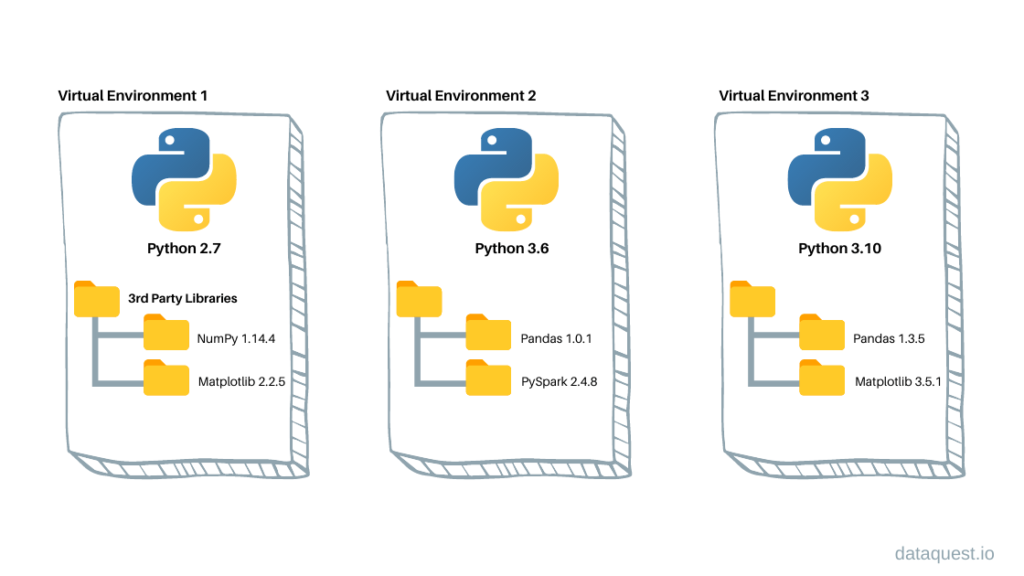
1.0 What is python virtual environment?
Python virtual environments create isolated contexts to keep dependencies required by different projects separate so they don’t interfere with other projects or system-wide packages.
1.1 Create python virtual environment with venv
# at root folder
python -m venv .data_exploration

# this will create a python virtual environment named "data_exploration"

# activate the virtual environment
source .data_exploration/bin/activate
1.2 Activate the virtual environment and install dependencies
With your virtual environment activated, type this command to install poetry.
What is poetry? : Poetry is a widely used tool for dependency management and packaging in Python
pip install poetry

# install all the packages and dependencies
poetry install
Other useful poetry commands
# add dependencies
poetry add <library_name>

# when it takes long time to revolve dependencies
poetry cache clear --all pypi

# add dev dependencies
poetry add <library_name> --group dev

# remove dependencies
poetry remove <library_name>

# run pytest
poetry run pytest
If you want to deactivate the virtual environment, simply type
deactivate
2. Folder Structure
  .
  ├── data/
  │   └── your_data_goes_here
  ├── docs/
  │   ├── report/
  │   │   └── Generated_report.html
  │   ├── example.ipynb
  │   └── index.md
  ├── exploration/
  │   ├── jupymodule/
  │   │   ├── arguments.json # place to store argument to pass to ipynb report
  │   │   ├── DataFrameMaker.ipynb # place to test and run ETL scheme
  │   │   └── Visualiser.ipyb # reusable visualisation fuction to use i the report
  │   ├── AllReport.ipynb # All user-level report
  │   └── UserReport.ipynb # Single user-level report
  ├── src/
  │   └── pydata # python library to use throughout the project/
  │       ├── cli # cli command to run dash or create report
  │       ├── dash # plotly dash to implement high-fidelity data visualisation prototype
  │       └── utils # utils to be used in ETL process
  ├── tests/
  │   └── test_pydata.py # place to write test codes
  ├── poetry.lock # do not change this file
  ├── pyproject.toml # project dependencies
  └── README.md
3. Supported commands
As you install pydata library in the development evironment with poetry install command, you are able to run several commands to help you generating the html report and run Plotly dashboard
3.1 Run command to run example dashboard
pydata dash # To launch the example dashboard
3.2 Run command to generate html report
3.2.1 User-level report
Run
poetry installcommand once more to install new cliNavigate to the root project folder
Run
pydata report UserReport.ipynb <userId>

# if you want to run the report with user `35897499`
pydata report UserReport.ipynb 35897499
3.2.2 General report
Run
poetry installcommand once more to install new cliNavigate to the root project folder
Run
pydata report AllReport.ipynb
4. Run test
To run the test with the installed python library(pytest), run following command
poetry run pytest
About the data
This dataset contains information from 3,395 high resolution electric vehicle charging sessions. The data contains sessions from 85 EV drivers with repeat usage at 105 stations across 25 sites at a workplace charging program. The workplace locations include facilities such as research and innovation centers, manufacturing, testing facilities and office headquarters for a firm participating in the U.S. Department of Energy (DOE) workplace charging challenge.
Source: https://dataverse.harvard.edu/dataset.xhtml?persistentId=doi:10.7910/DVN/NFPQLW
Building the documentation
Build page
Navigate to docs folder and run the following command
  cd docs

  # run make command
  make html
This will generate _build folder with generated html
Host to Github page
Run follwoing command from the root project folder. This command will write a commit to your gh-pages branch with the current documents in it and push the change to the remote gh-page branch
ghp-import -n -p -f docs/_build/html
Contributing
Interested in contributing? Check out the contributing guidelines. Please note that this project is released with a Code of Conduct. By contributing to this project, you agree to abide by its terms.
License
pydata was created by Minjoo cho. It is licensed under the terms of the MIT license.
Credits
pydata was created with cookiecutter and it’s largely based on the py-pkgs-cookiecutter template.